MBXHub
MBXHub
MBXHub transforms your media library into a network-accessible exchange service. Control or access from any device. Integrate with any system.
Dashboard
Dashboard Search
Why MBXHub?
MusicBee is a powerful desktop music player, but it's trapped on a single machine. MBXHub breaks it free - enabling control from any device, integration with any system, and access from anywhere on your local network.
- Local network first - No cloud, no internet required
- Standard protocols - REST and WebSocket, nothing proprietary
- Complete coverage - 100% of MusicBee's API exposed
Easy to Configure
The Dashboard adapts to your setup. Scale it for a phone or a living room TV, pick your theme, choose which panels to show, and drag to reorder. All from MBXHub Settings.
All panels - dark
Compact - light
Minimal
Collapsed
Charms
Custom Theme
Tap the QR icon to share the dashboard with any device. Guests scan to connect instantly - no URL typing needed.
Built-in zoom levels let the dashboard fill a phone screen or a living room TV. Pick the size that fits your display.
Show or hide any panel. Drag to reorder. Set how many panels stay visible vs. collapsible. Seven configurable sections.
QR Connect
Dashboard Settings
BYOWA - Bring Your Own Web App
MBXHub serves HTML. Build your own player UI that calls the REST API. Start fresh using llms.txt with Claude, or just use the included examples.
Full-featured music browser included as a sample. 3-column layout with library browse, now playing, and queue management. Responsive for desktop and mobile.
- Browse Albums, Artists, Genres, Playlists, Podcasts, Radio, Moods
- Search your library
- Queue tracks: Now, Next, or Last
- Listen Here — stream audio to the browser
- Live WebSocket updates
Let the party pick the music. Big artwork display, guest song requests with PIN, vibes voting, and DJ controls.
- Search and Queue tracks with DJ
- Guests connect via QR code scan and can give requests and reactions
- TV-friendly display with lyrics
- Reactions with floating emojis
- AutoQ - Vibe-based 'AutoQ' track selection
What would you build? The API is yours to explore.
- Kiosk - Now playing on a living room TV
- Car Mode - Big buttons for dashboard tablet
- Voice - "Play something by The Beatles"
player.html - desktop
player.html - mobile
Network Discovery
MBXHub announces itself on the local network using SSDP and WS-Discovery. Find it automatically in Windows Explorer under Network.
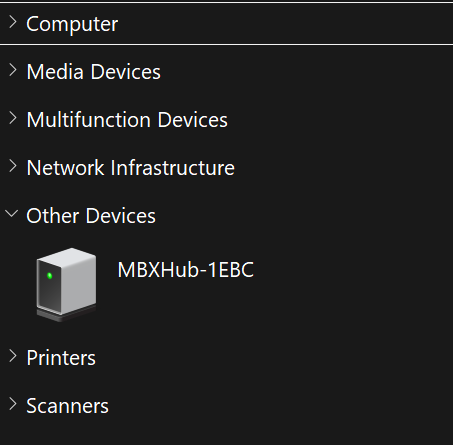
Network Discovery
Components
The core. REST API with 155+ endpoints, WebSocket events, built-in Now Playing dashboard, and self-hosted API docs with examples.
Built-in Now Playing web UI. Real-time updates via WebSocket. Control playback from any browser.
Browse your library from any device. Album grid with artwork, search, and one-tap queue. 7 tabs — Albums, Artists, Genres, Playlists, Podcasts, Radio, Moods.
Remote automation. Send keyboard/mouse input, trigger hotkeys, run macros with DuckyScript syntax.
Vibe-based intelligent queue. Multi-factor scoring picks the right track using mood, reactions, influences, and diversity. Genre-aware weight adjustment and confidence scoring make mood estimates smarter and more transparent.
Mood Scanner Controls

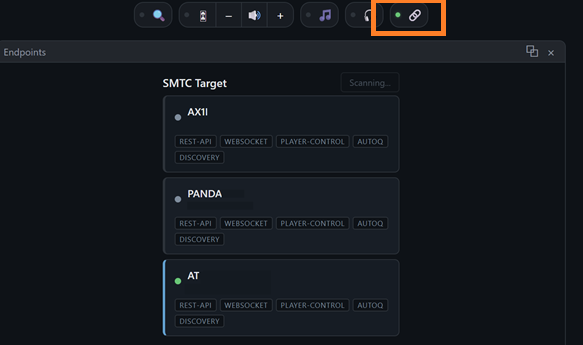
Standalone EXE with Windows app identity. SMTC bridge shows app name in the media flyout. SMTC Link Charm lets you switch which machine your media controls target. Auto-reconnects to MusicBee.
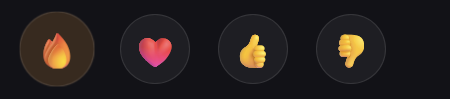
Influences shape the mix — thumbs up an artist to hear more of them, thumbs down a genre to fade it out. Reactions are per-track vibes: fire a track you love, thumbs-down one that killed the mood. AutoQ watches both and steers the queue toward what's landing.
Mini web apps on the dashboard charm bar. Browse your library, control network speakers, switch audio output devices, and manage volume — all without leaving the dashboard.
Charm Bar
Mixer
Phantom
Now Playing
Up Next
Lyrics
MBXHub announces itself on the local network using SSDP and WS-Discovery. Find it automatically in Windows Explorer under Network.
Get Started
- Download MBXHub
- REST API Documentation - 155+ endpoints
- Feature Overview
Requirements
- Windows 10 or later
- MusicBee 3.x
- .NET Framework 4.8 (plugin)
- .NET 8.0 Desktop Runtime (MBXHub.exe Shell)
Roadmap
v0.4.5 - Dashboard, Influences, Network Discovery, Firewall Config
v0.4.6 - PartyMode, Static Pages, BYOWA
v0.4.7 - API Access Control
v0.4.8 - MBXQ merge
v0.4.9 - AutoQ, Tiered Reactions, Leaderboard, Floating Emojis
v0.5.0 - MBXHub.exe Shell (SMTC bridge, Windows identity)
v0.5.0.1 - WS-Discovery, SSDP enhancements, dashboard scaling, QR connect, layout controls
v0.5.0.2 - RemoteApp for MusicBee (RDP), REST API + Shell CLI
v0.5.0.3 - Device Proxy
v0.5.0.4 - Charms, Charm Bar
v0.5.0.5 - Phantom device support
v0.5.0.6 - Podcast support, Listen Here audio streaming
v0.5.0.7 - Genre-aware mood tuning, confidence scoring, mood combo labels
v0.5.0.8 - Library browser, diacritic-aware search, responsive player
v0.5.0.9 - Performance optimizations, playlist folder grouping
v0.5.1.1 - Taste Explorer, DJ Taste Tab, Mixer Charm, Album Artist browsing, Album Grid enhancements
v0.5.1.2 - Mixer: multi-fader volume control, Windows device volume, network speaker integration, mDNS discovery
v0.5.1.3 - Audio device enumeration, dashboard charm persistence
v0.5.1.4 - Unified browse, persistent charms, on-demand mood scanning, HSL theme system
v0.5.1.5 - Automatic mood scanning, mobile gestures, improved search
v0.5.1.6 - MetaServer, distributed scanning, peer sync
v0.5.1.7 - SMTC Link Charm, remote control made easy, scanner delegation
v0.5.1.8 - Crate full of albums, artwork explorer
v0.5.1.9 - Dashboard search, 6 now-playing display styles, configurable charm buttons and progress bar, startup diagnostics
v0.5.2.0 - MusicBee API v58, browse tracks tab, video actions, high-DPI/4K fixes, case-insensitive search, mobile touch targets
v0.5.2.1 - Men at Work: immersive blur-fill artwork, REST observability, API v58 endpoints, volume & pinch-zoom toggles
v0.5.2.2 (current) - Search Party
v0.6 - MBXSync (coming soon)