
Cast engine reference
back to docs
How MBXHub casts MusicBee's queue to a Google Cast speaker: who does what, what a start does and how long each
part may take, how the speaker's queue follows MusicBee's, what happens when a track cannot be played, and how to
read the logs when something goes wrong. It describes behavior you can observe from the API, the pages and the
logs. The routes themselves (/cast/*) are in the API documentation: /docs on any hub, and llms.txt, under Cast.
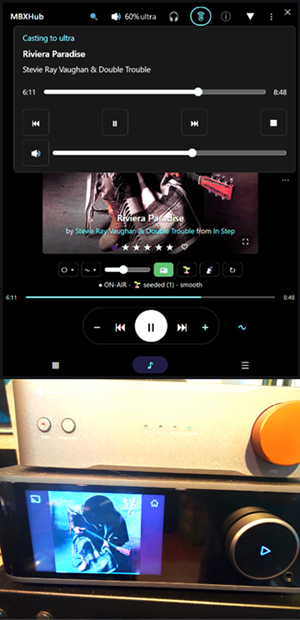
A first-try cast to a WiiM Ultra, showing the playing track's album art on the speaker's display.
Anatomy of the MBXHub cast implementation
Each part, in Google Cast terms:
| Cast term | What it is | In MBXHub |
|---|---|---|
| Receiver | The Cast device, running the Default Media Receiver app. It fetches and plays the media itself. | The speaker (WiiM, Phantom, Nest, and so on) |
| Sender | The app that opens the Cast session (TLS, port 8009), launches the receiver app, and sends LOAD, QUEUE and transport commands. Cast calls this the controller. | The MBXHub Shell (MBXHub.exe) |
| Media server | The HTTP origin the receiver pulls audio and artwork from. It never speaks Cast. | The hub (the MusicBee plugin, mb_MBXHub.dll): /stream, track artwork, and converting ahead |
| Queue source | The system of record for what plays. | MusicBee. The Shell mirrors its queue onto the receiver. |
| Remote UI | Controls the cast without speaking Cast: it calls the hub's /cast/*, which the hub forwards, signed, to its paired Shell. | The HUD and the web pages |
| Native UI | Controls the cast from inside the player. It speaks to the hub's engine through a process-local bridge, never Cast itself. | The MBXCast plugin (mb_MBXCast.dll): a panel in MusicBee |
The same parts, as a stack. Five roles, two paths: control walks down the stack through the Shell; audio never does - the speaker pulls it straight off the hub.
The Shell is in the control path only. Every command - from the HUD, from the MBXCast panel - converges on the hub, which signs and forwards it to its paired Shell; the Shell is the one process that opens the Cast session and talks to the receiver. Audio takes the dashed path: the receiver fetches it from the hub's HTTP origin itself, so the Shell never carries a byte of it and the hub never speaks Cast.
1. What casts, and where
The hub never talks to a speaker. Each hub hands casting to its own paired MBXHub Shell (MBXHub.exe). By
default that is the Shell on the hub's own computer; a hub can name a Shell on another computer with its
shellAddress setting, and it uses that Shell only when the two are paired. The Shell finds the speaker, holds the
one connection to it, loads the queue on it, sends it every command, and keeps its queue in step with MusicBee's.
- The hub decides who may cast. It gates the cast commands the way it gates
/player/*, then forwards/cast/*to its Shell, signed. The Shell answers only the hub it is paired with. - The speaker gets its audio from the hub, not from the Shell. It fetches each track, and its artwork, from the
hub's LAN address, at the same
/streamURL Listen Here uses. While the cast lasts, the hub admits the speaker's address for those two kinds of request, past a password or API keys, and for nothing else. A cast and Listen Here share one hold. Listen Here plays MusicBee's queue in a browser; the hub lets one remote player hold the audio at a time, and whoever holds it keeps it until they let go. A cast asks for that hold once the speaker has the queue, and gives it back when it stops. That is what "takes Listen Here" and "Listen Here is released" mean below.
- Nobody listening: the cast takes the hold. A browser that then turns on Listen Here is refused, and the page stops and says what holds the audio.
- A browser already listening (including mirror mode): the browser keeps the hold and keeps playing. The cast plays
anyway, without the hold, and the Shell logs one Warn:
cast is playing without Listen Here ownership. - Either way, starting a cast pauses MusicBee if it was playing, so MusicBee's own speakers stop.
- A cast lives in the Shell. It survives a MusicBee restart. It ends when it is stopped, when the speaker's connection is lost, or when the Shell exits.
- One cast per Shell. A second start while one plays answers
409 CAST_ACTIVE.
A page or HUD shows and controls the cast of the hub it is pointed at. Pointed at another hub, it shows that hub's cast, run by that hub's Shell, on that hub's computer.
Which computer's log to read
Read the logs on the computer of the hub the page or HUD is pointed at (or of the Shell that hub names, when it names one elsewhere). Not the computer the page is open on.
A worked example. Two computers each run MusicBee with MBXHub and a Shell: computer A holds the main library, and computer B is a second machine with its own hub. A HUD open on B, but pointed at A's hub, starts a cast.
- The cast runs in A's Shell. The start, its phases, the speaker's answers and the queue sync are in
mbxhub-shell.logon A. - The conversions and the speaker's fetches are in
mbxhub.logon A. - A rescan from that HUD that finds no speakers is A's scan, on A's network adapters.
- B's logs show none of it.
Observed on one setup
Casting to a WiiM Ultra that was grouped with another speaker through WiiM's own app worked: the cast played through the pair, and the WiiM app stayed in step with it. The Shell knows nothing of the grouping; the speaker's own ecosystem carries it. That was observed on this hardware, and is not a general guarantee.
2. Starting a cast
The HUD, Play page, dashboard and Cast Charm reuse one control. Choose a speaker when no cast is active. During a cast it shows the speaker's album art beside the title and artist, plus position, volume and transport controls.
A start reports what it is doing:
| Phase | Meaning |
|---|---|
| Preparing | Reading the starting queue from MusicBee. |
| Converting | Preparing a compatible first track when conversion is enabled. |
| Connecting | Reaching the receiver, checking for an existing session and launching after admission. |
| Sending | Loading the queue onto the receiver. |
Conversion begins after receiver admission and can overlap the remaining Connecting work. An empty queue fails before loading; a proven conversion failure skips that track. Transcoding needs ffmpeg and must be enabled in MBXHub settings. The normal start budget is 60 seconds, and a timeout does not prove the speaker did nothing.
A start resumes MusicBee's current song at its current position. A CUE row is one song: it starts at its offset in the file and ends at the end of its segment.
If the speaker is already in use by another computer, the control offers Cancel, Replace session, and Join existing queue when the speaker confirms it is really playing. Replace interrupts the other session and loads this hub's queue; a speaker it cannot inspect is left alone. A replacement decision expires after a minute and is re-checked against the speaker before launching, so a session that changed in the meantime needs a new decision. None of this can reserve the speaker against other Cast senders.
A joined controller can play, pause, seek, change volume, select a queue row, Leave or Stop. It cannot add
tracks or change queue policy (409 CAST_JOINED_QUEUE), mirror its own MusicBee queue, take Listen Here or report
plays - additions, AutoQ and accounting stay with the controller that started the cast. To edit that queue, point
the page at the hub that owns it. Joined Stop tears down the speaker's session without moving this machine's
MusicBee; Leave only disconnects this sender.
The speaker chooser rescans every ten seconds while it is open, through the paired Shell's discovery, and suspends when closed or hidden. All controls on a page share one scan.
In MusicBee, use the cast icon on the MBXCast panel or Tools > MBXHub > Cast Control. Both open the control for that MusicBee instance, even when the HUD is pointed at another hub. The panel icon always opens Cast Control, including during an active cast; opening it does not disconnect the speaker or change queue ownership. Selecting a speaker while MusicBee is stopped or paused connects without loading or playing its retained queue. Press Play to begin. If MusicBee is already playing, speaker selection transfers that playback as before. Use Cast Control's Stop casting action to end the session.
Native Play waits within its existing timeout for a pending control or follow operation, then rechecks the same session and queue admission before sending playback. It cannot carry a waiting request into another instance or ownership change. Explicit native input supersedes read-only follow preparation. On Stop, MusicBee's local output must return before playback is attempted to restore the paused song and position.
Themes. MBXCast's About/settings dialog, dock panel and context menu use the MusicBee settings skin, including the current PPS and wake controls. Standalone Cast Control uses the HUD overlay theme slot on first load and refreshes its colors when recalled, retaining its queue view and session. A Cast control embedded in another page inherits that page's theme. There is no separate Cast theme setting, and theme selection does not change which MusicBee instance the control targets.
3. During a cast
Expand Speaker queue to see the tracks the speaker has loaded and which occurrence is playing. Select a row to play that occurrence without adding another copy. This is the speaker's loaded window, not MusicBee's entire list.
Seeking is offered only when the speaker says it supports it; otherwise the slider is disabled and /cast/seek
answers 409 CAST_SEEK_UNAVAILABLE. Previous then goes to the previous queue item instead.
Two outputs, two positions. Starting a cast pauses local MusicBee playback. If local playback is resumed there are two players with separate positions: MusicBee's own Now Playing describes the local one, Cast Control describes the speaker. Seeing one track in MusicBee and another on the speaker can be correct for both. Faster screen updates do not make them synchronized.
Two different things are called Stop, and they do different things. Stop in Cast Control ends the cast. Stop in MusicBee's own transport, while MBXCast's output is driving a cast, pauses the speaker and keeps the session: Play afterwards resumes a live cast rather than rebuilding one, which is what makes MusicBee's transport usable during a cast at all. Only the first is a teardown.
Stop tears down the speaker's session, releases the Listen Here hold, and leaves MusicBee paused on the same song and position. Pause keeps the session and the queue. Leave disconnects this Shell without stopping the speaker: its queue keeps playing and other senders keep control.
MusicBee viewing a HUD-started cast. When MusicBee does not own the queue and this Shell is not a joined
controller, Leave controls in the Cast Control window opened from MusicBee closes that view only. It sends
neither Leave nor Stop to the Shell, so the HUD keeps its cast, queue and controls. Reopening the window shows the
current cast again. This does not change queue mirroring or acquire ownership. A MusicBee-owned cast or an
independently joined Shell retains the controller Leave action described above; /cast/leave remains Shell-wide.
After a connection drop, choose the same speaker again within two minutes and the Shell resumes control of the cast it had - same queue, no reload - rather than starting a new one. After that the ordinary occupancy checks apply. This is memory in the running Shell: it does not survive the Shell exiting, and it cannot keep the audio available if the hub's computer sleeps.
Connected idle (EV3 source change). A MusicBee-owned destination can connect with an empty queue. When media finishes or MusicBee clears the queue, the speaker and Cast output remain selected, while old media commands and receiver-item bindings are retired. Adding tracks alone does not autoplay. The next explicit Play reads the current MusicBee occurrence and loads fresh media, including the correct duplicate or CUE row.
The October 5 MB3 repair checks queue validity once after IDLE/FINISHED, using a read-only request;
that status alone does not retire media between tracks. A correlated INVALID_MEDIA_SESSION_ID reply
retires the matching media authority and publishes connected idle. An old reply cannot revoke a newer load.
Explicit Play can recover a revoked native selection before the handoff timer runs for a new command
lifetime on the same selected destination, with MusicBee still using the Cast output. A confirmed
CAST_NATIVE_QUEUE_CHANGED refusal also allows the next Play to recover within the same session
after rechecking the host output, destination, and MusicBee ownership. The failed request remains a retained
negative receipt; a new Play captures the current native row under a new request identity. It does not
automatically retry or resume an old track. Uncertain commands are
not replayed, and rejected native Play callbacks log their admission reason. C# regressions and host
verification of this repair remain unexecuted.
If the receiver app expires while idle, Play inspects the speaker again and launches only after admission. An occupied speaker still requires the existing replacement decision. There is no idle relaunch loop, silent track or extra keepalive. An orderly channel close following observed idle-app expiry can wait for Play; other failures retain the existing recovery policy. Stop casting or selecting another MusicBee output cancels pending activation and releases the destination. With automatic connection off this remains session-local. Wake-on-LAN integration and live audio mirroring remain separate work. Source changes do not establish release readiness; C# and host acceptance for this change remain unverified.
Persistent Preferred Speaker (PPS)
The October 5 PPS source adds Automatic connection and an explicit preferred-speaker choice to MBXCast settings and its native context menu. It saves the receiver identity per MusicBee instance and connects at startup without loading or playing queued music. MusicBee owns the queue; its saved sharing choice still applies. Normal Cast Control speaker selection is temporary until restart.
Enabling Automatic connection for the same speaker already connected to MusicBee adopts the existing destination, preserving its queue, playback position and session without stopping or reconnecting it.
The Shell runs one connection attempt at a time, retrying after 2, 4, 8, 16, 32 and then 60 seconds. Automatic connection never confirms a takeover. Stop casting suppresses it until MusicBee restarts; restarting the Shell does not undo that choice. A 15-second host-intent lease fences pending work when the Hub disappears. Late results cannot override Stop, a newer preference or a replacement destination.
PPS retains the selected Cast output through idle periods and outages without granting false playback authority. Turning it off releases the MusicBee-owned cast and selects the default output. The companion resolves DirectSound's localized default entry and requires MusicBee to list it; an unavailable or refused default produces an actionable notice instead of selecting an arbitrary device. Later user output choices win.
Configuration remains native-only over an optional versioned bridge and the paired Hub's signed internal channel. Retry detail uses existing Trace logging. Shared device wake integration is a separate dependency; PPS adds no WOL sender, silent keep-awake media or live audio capture. C# regressions and live PPS acceptance remain unexecuted.
4. Queues and modes
MusicBee origin and sharing are separate. A verified start from MusicBee's menu or MBXCast panel belongs to MusicBee. Its native token carries that identity through Cast Control to speaker selection. The menu starts Dedicated; the panel follows Let others add tracks: Off selects Dedicated, On selects Shared. Allowing contributions does not surrender native playback, following or accounting authority. HUD, phone and other client starts remain Shared without native ownership. Public request bodies cannot claim native ownership.
| Mode | Queue authority and contributions |
|---|---|
| Shared | Remote contributions use the existing Shell ledger/native projection. A MusicBee-started cast keeps native ownership. Remote Next uses one saved FIFO, LIFO or always-tail policy. Changing policy leaves accepted requests in place. |
| Dedicated (MusicBee's Cast Control menu; an MBXCast panel start with its toggle unchecked) | MusicBee owns the queue. Client queue edits and automatic queue-feeder controls are refused; Cast Control still handles speaker playback. |
Native playback, following and accounting use the running cast's musicBeeOwned flag; contribution
gates use its mode. A saved default grants no authority. Legacy status without that flag falls back to Dedicated
only; joined sessions never grant native ownership.
The panel's settings icon holds Let others add tracks and Where other people's tracks go. Each choice commits as it is made and can update a running cast; the dialog reports anything it is waiting on. Controls remain visible when unavailable, with their existing disabled-state explanations.
MusicBee supplies the starting queue; the Shell then keeps one intended order and feeds a bounded window to the speaker. Edits made from the controller are mirrored back into MusicBee's list, and additions made in MusicBee are picked up where they landed. An edit the Shell cannot confirm is never repeated blindly - it is retained and reported rather than sent twice, so a lost answer cannot queue a second copy.
MBXCast is an optional enhancement. The hub, the Shell, Cast Control, the Tools > MBXHub > Cast Control launcher, remote clients and the Shared/Dedicated rules all work without it. The MusicBee menu can start a Dedicated cast with or without the companion. MBXCast adds its own panel and - with its output selected during a MusicBee-owned cast - MusicBee's current row following the speaker's. Installing it does not change playback or replace the current queue.
Use mb_MBXCast.dll, mb_MBXHub.dll and MBXHub.exe from the same distribution. Its README travels with the
bundle as README-MBXCast.md.
Native volume and mute
With MBXCast's output selected in an acknowledged MusicBee-owned session, MusicBee's native volume and mute controls drive the speaker, including while connected idle. Cast Control keeps its receiver controls. The dock is one DPI-scaled row: Cast icon, speaker/status text with a full tooltip, and a borderless settings button.
The receiver is the initial authority. The companion projects fresh receiver volume/mute into MusicBee and links each control only after host readback confirms that value, allowing normal percent rounding. A local/default level, including 100%, is never sent to initialize the speaker. Only subsequent native adjustments use the existing session-guarded commands.
Unknown values, failed reads/readback, output changes or reselection, lost ownership, reconnects and receiver replacement reset the link and discard unsent adjustments. Programmatic and delayed old host echoes are suppressed. Commands are serialized and coalesced; stale completion cannot project into a replacement session. Cached status cannot immediately pull back a pending adjustment; a fresh matching report or a bounded two-second hold permits resynchronization.
On return to local output, a new local user adjustment is preserved. Otherwise the binding uses the lower of the saved local and last managed levels and retains either mute state. The handoff does not automatically raise volume or unmute, and sends no receiver volume/mute command. This is conservative numeric handling, not physical loudness calibration between devices.
No public endpoint or request field changes, Windows endpoint controls or sample scaling are added. Trace records inheritance, link invalidation and dispatch; unconfirmed commands produce warnings. Matching updated components are required. Static checks only: compilation, regression execution, MusicBee callback timing and live volume behavior remain unverified.
Native playback tracing
Use the existing MBXHub logging controls: Enable debug logging and
Log level: Trace. Detailed native diagnostics use HubLogger's standard format,
live filter, writer and rotation. They are absent at Debug/Info and do not fall back into the companion's
always-written summary file. An optional process-local trace delegate carries companion events;
older Hubs keep normal playback behavior without this additional detail.
Each MusicBee Play has a callback ID; its admitted request ID combines the observed
admission sequence with that callback ID. Trace covers entry, local refusal/echo, the operation blocking
admission, cached ownership and item state, exact native queue capture, dispatch, response, receipt, outcome,
timeout, exception and late completion. Search both IDs in AppData/MBXHub/mbxhub.log.
An entry without dispatch identifies a local refusal; capture failure identifies the Hub boundary;
the response records the engine status. No entry means these callbacks were not observed while the Trace
sink was available. Logging failures cannot change playback or authorize recovery.
Connected-idle bridge contract
Native playback results may include optional refusalCode: "CAST_NATIVE_QUEUE_CHANGED" with
acknowledged: false and no item ID. The Hub emits this only for the controller's explicit HTTP 409
Play refusal; the companion validates the ordinary generation/session/request envelope before accepting it.
This permits a recheck on the next Play, not transport or following authority. Missing/unknown results,
timeouts, changed outputs, stale/foreign sessions, and mismatched identities do not grant same-session recovery.
The descriptor version and framework-only bridge types are unchanged; older components retain their
conservative refusal behavior.
The source-linked bridge keeps descriptor version 2. Optional connectedIdleVersion: 1 identifies
support for destinationId and idlePlaybackAvailable. The destination is a new 32-character
GUID per selection and survives media exhaustion. sessionId identifies the command lifetime and
rotates when media ends; neither is the receiver's app/media ID.
playbackAvailable still requires a proven current receiver item. The idle capability permits only
a first Play; attach, following, seek and pause still require current-item proof. Missing/unsupported version or
malformed destination identity never grants idle selection. A MusicBee Shared start to an older Shell that cannot
represent ownership is refused before consuming its native intent.
The existing control delegate's optional release action carries the expected destination ID.
The Hub sends /meta/cast/stop with expectedDestination; the engine rejects a different
destination. Ordinary Stop/volume/mute retain expectedSession. The companion confirms that MusicBee
actually selected another output; a transient null renderer callback followed by Cast reselection does not release it.
5. When something looks wrong
| Observation | Meaning / next check |
|---|---|
| No speakers listed | Discovery runs on the paired Shell's computer. Check that machine's network and rescan. |
| A start reports a phase for a long time | Read that phase and the Shell log's step timing; do not start a second session blindly. |
| Queue update timed out or failed to converge | The requested edit is unconfirmed. Playback may still work; a timeout alone does not show whether the receiver applied the edit. |
| Waiting for speaker confirmation | An ordinary insertion has an unresolved outcome. Further edits wait for a usable receiver queue read; repeated requests cannot force confirmation. |
| Waiting for MusicBee confirmation / previous update unconfirmed | The edit is never repeated. A fresh Start requests a guarded new baseline; if that cannot be confirmed, CAST_NATIVE_UNCONFIRMED explains the refusal. |
| Native row correspondence is ambiguous | Cast continues from its accepted queue. Resolve the ambiguous native duplicate to resume mirroring; the unproven addition has not been imported. |
| Cast is waiting for queue capacity or outstanding commands | Too much is unresolved at once: a client edit answers 429 CAST_REQUEST_LIMIT and mirroring retries later. Playback continues and the speaker's queue is still delivered. It clears on its own; a new cast is not needed. |
| A control or request is refused as belonging to another cast | Commands carry the cast the caller was looking at. When that cast has ended or been replaced the answer is 409 CAST_SESSION_CHANGED and nothing is done. Refresh and act on the cast now shown. |
| A request ID is refused | CAST_REQUEST_INVALID is an ID the cast never issued. CAST_REQUEST_EXPIRED is a retry of a request that already settled and left the history - it was not run again. |
| Replacing a session you just ended | Not asked for any more: a start that failed after the receiver app launched recognises that app as ours and proceeds. A genuinely foreign session still prompts. The app stays on the speaker until its own idle timeout. |
| A start says the queue configuration could not be read | The Shell answered, with something the hub could not parse. It does not mean the Shell was unreachable - nothing answering at all is 503 CAST_NO_SHELL. |
| Cast ends after another sender takes over | The owned session changed. The Shell releases its old controller state and leaves the replacement alone. |
| MusicBee and Cast show different tracks | Check whether local MusicBee and the receiver are both playing before treating either title as stale. |
| An old connected session will not accept edits | Stop and choose a speaker again recovered the observed session. This is a recovery action, not proof the underlying fault is fixed. |
Read mbxhub-shell.log on the paired Shell's computer for discovery, session phases and receiver queue replies.
Read the hub's mbxhub.log for API requests, AutoQ changes, conversion and media delivery. Receiver status, queue
membership and playback are separate evidence; an accepted command alone is not queue confirmation.
The route and error contracts remain in the hub's /docs and /llms.txt, under Cast.
6. SDK, testing and certification references
MBX uses a custom C# sender with Google's Default Media Receiver. These references guide protocol behavior and acceptance checks; they do not mean MBX runs the Chrome Web Sender SDK.
| Reference | Use here |
|---|---|
| SDK/API index, Web Sender Media API, media messages | Session identity, transport commands, status updates and estimated progress. |
| Receiver queueing, QueueManager API, Android / iOS queueing | Receiver-owned playback queues, item IDs, sender synchronization and queue lifetime. |
| Design checklist | Cast button states, connected controls, queue display and stopping. |
| Testing guidance and official test cases | Google's manual acceptance cases, including multi-sender and queue behavior. Record device/build, applicability and result. |
| Command and Control tool, Cast Debug Logger | Receiver testing/debugging references. Logger integration requires a receiver that enables it; MBX does not own the Default Media Receiver code. |
| Registration and publishing, UX/brand guidance | Google's published app requirements. Default Media Receiver applications do not require receiver-app registration. Registration is not certification. |
Certification status: no public automated certification suite for this custom sender was found in the reviewed documentation. No Google certification or official manual-test pass is claimed. MBX's automated protocol tests, browser checks and actual-device results are separate evidence. References checked September 28, 2026; use Google's current test sheet for each new test cycle.